I am the creator of a writing tool called Rewright, so people ask me about Lex a lot. Here are the three alternatives I think are genuinely worth a look, what each one does well, where each one frustrated me, and how to decide between them without doing seven free trials.
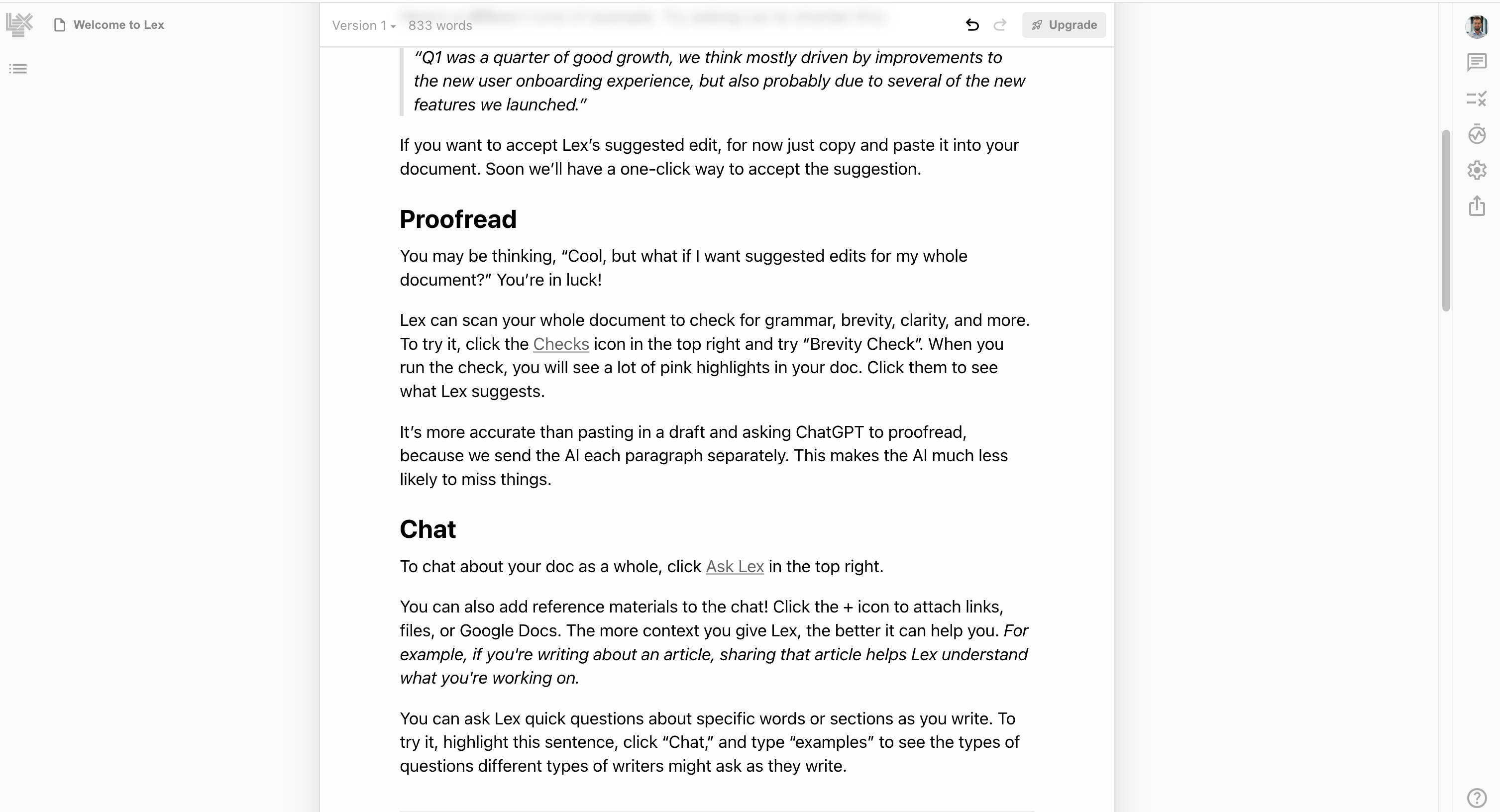
Lex is a good product. It came out of a real frustration, that most AI writing tools either generate content for you (ChatGPT) or police what you wrote (Grammarly), and almost none of them actually help you draft. Lex's answer was to put AI commands inside a clean document editor: hit a shortcut, ask the AI for a continuation or a rewrite, accept or reject, keep going.
That model works. It also has a ceiling, and that ceiling is what brings people to this page. There's nothing wrong with Lex; there are just writing workflows it doesn't fit.
Three things tend to push writers off Lex after a few months of real use.
The command tax. Lex's AI is invoked, not ambient. Every time you want help, you stop, hit a command, read the output, decide what to keep, and resume. That's fine if you need help twice a session. If you need it twenty times, the friction compounds and you start avoiding the feature you bought the tool for.
The team-tool feel. Lex was built with collaborative writing in mind. There's nothing wrong with that, but it shows up in the UI even when you're alone. Sharing affordances, comments, multi-user conventions. If you're a solo writer, you're paying overhead for features you'll never use.
The amnesia. Lex thinks document by document. It reads the page you're on and works from there. It does not build a picture of you across documents , your sentence rhythm, the words you reach for, the ideas you keep returning to. Every new draft starts cold, which is exactly when good context would help most.
If any of those bothers you, you have options. Below are the three I'd actually point a friend to.
I'll be transparent: Rewright is the tool I build. I'm including it here because I genuinely think it's the right answer for a specific kind of writer, and if I left it off this list to seem objective I'd be wasting your time. Read me with appropriate skepticism.
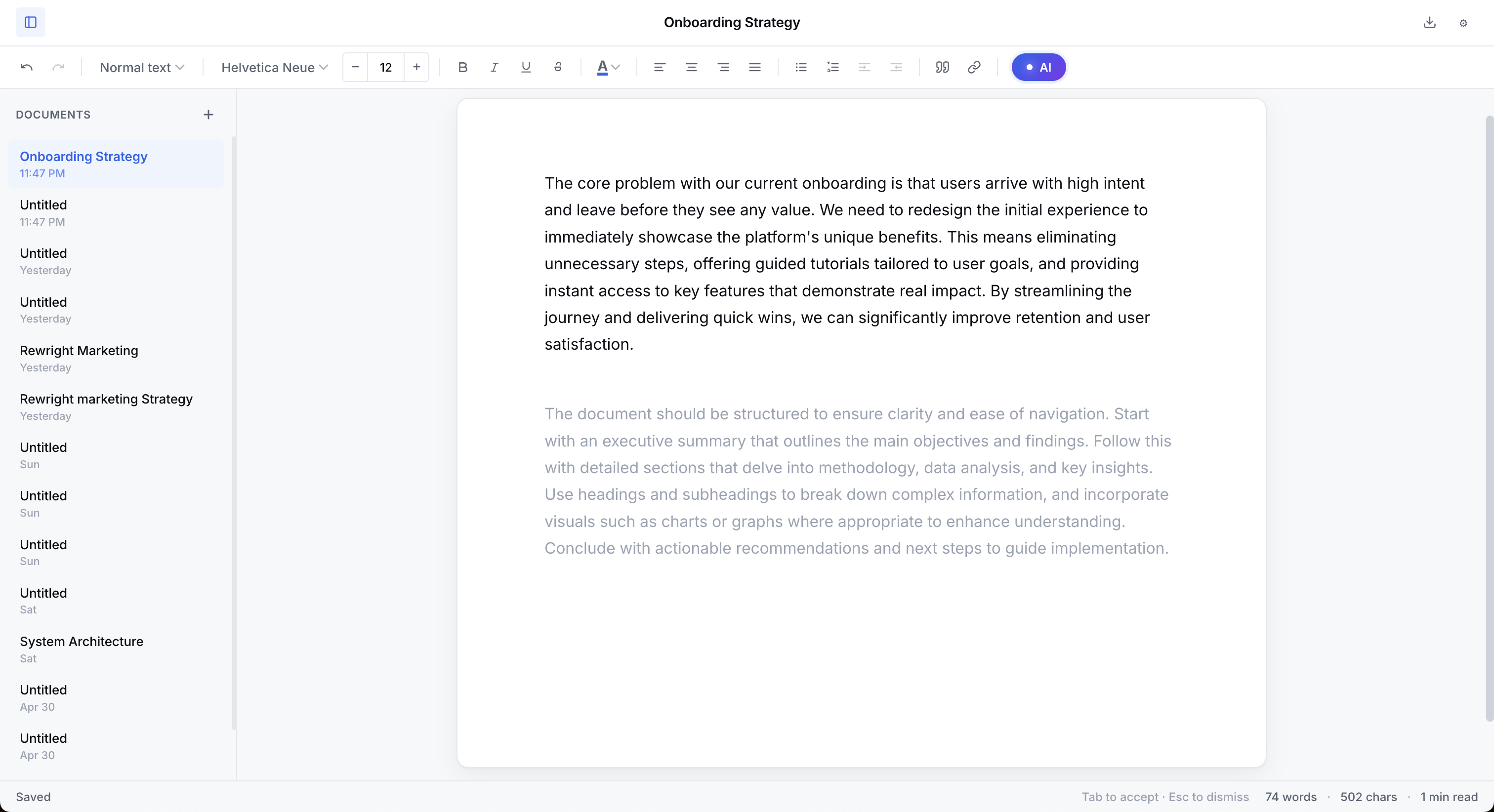
The premise is the inverse of Lex's. Instead of summoning the AI when you need it, the AI is always quietly there: as you type, a soft ghost-text continuation appears at the cursor. Tab accepts it. Anything else, keep typing, hit space, move on, dismisses it. There are no commands to learn. The AI never opens a modal, never asks you to read its output before you can continue.
That changes how the tool feels. With Lex, the AI is a coworker you ping. With Rewright, it's more like predictive text that happens to write whole sentences. You stop noticing it as a feature and just notice that the draft moves faster.
Pro is $15/month, Studio is $27/month, both include a 7-day trial. Cancel anytime before it ends and you won't be charged. There's no free tier, the trial is the test drive. If you know after seven days, you know.
No collaboration features at all. No way to share a doc with a co-writer live. No commenting. Also no slash commands or chat interface, if you specifically liked invoking AI on demand, Rewright will feel like the feature is hiding from you. It isn't, it's just always-on. But the re-orientation takes about a day.
iA Writer has been the patron saint of distraction-free writing apps since 2010, and the only reason it's on a list of AI alternatives is that some Lex users don't actually want AI in their drafting, they want a clean place to write, and Lex was the closest they could find. If that's you, iA Writer is the more honest answer.
There is no AI in iA Writer. There never has been, and the team has been vocal about why: their argument is that writing is the part of writing you should not delegate. You can disagree with the philosophy. The tool that comes out of it is, for what it's worth, beautiful.
One-time purchase, around $50 for macOS or iOS, $30 for Windows or Android. No subscription. (It's been this way for over a decade and they show no signs of changing.)
No AI of any kind. If you came to Lex specifically for the AI help and what you wanted was a different AI experience, iA Writer is not your tool. It's for writers who want to be alone with the page.
Type.ai sits in the same shape as Lex, an AI document editor where you invoke the AI when you need it, but it bets harder on one specific thing: voice. You feed it your past writing, it builds a style model, and the output that comes back is meant to sound more like you and less like a chatbot.
That's the pitch, and for some writers it lands. Lex's biggest weakness for voice-conscious users is that its output reads as competent but generic. Type.ai tries to fix that specifically, assuming you're willing to do the training work upfront.
Free tier with usage limits. Paid plans start around $19/month and the full-features tier (with deeper voice training) is in the $30/month range. More than Lex Pro for what's a similar command-based experience, with voice training as the differentiator.
It's still command-based, which means the friction that drove you off Lex (prompt-based experience) is still there. The voice training is real but takes sustained effort to set up well, and you're paying more for the same general interaction model. If voice is what you specifically want, it can be worth it. If it's the friction model itself, Type.ai isn't the fix.
Don't do three free trials. Pick based on what bothered you about Lex.
If what bothered you was the command friction, every time you want AI help you have to stop and ask for it, try Rewright. Always-on completions are exactly the fix for that.
If what bothered you was the presence of AI at all, if you found yourself fighting it more than using it, try iA Writer. Going back to a great editor without AI is a real option, and people underestimate how much a clean tool helps even without AI.
If what bothered you was the generic-sounding AI output, and you're willing to put in the training work upfront, try Type.ai. Same general command-based shape as Lex, but bets harder on matching your voice.
| Tool | Best for | AI model | Starting price |
|---|---|---|---|
| Rewright | Solo writers who want AI that follows their lead | Always-on inline completions | $15/mo, 7-day trial |
| iA Writer | Writers who don't want AI in the loop at all | None | $50 one-time |
| Type.ai | Solo writers willing to train an AI on their voice | Command-invoked, voice-trained | $19–30/mo |
| Lex (for reference) | Hybrid solo/collab writers comfortable with commands | Slash-command invoked | Free + ~$12/mo |
Rewright. Same general space, AI inside a clean writing editor, but always-on inline completions instead of slash commands, and a solo-writer focus instead of a team focus.
iA Writer is the closest match. Same minimalist writing-environment feel, no AI at all, mature ecosystem, one-time purchase. If you came to Lex for the editor and away from it because of the AI, this is your tool.
They can substitute, but they're chat tools, not writing tools. You'll be tabbing back and forth, copy-pasting, and writing in a separate doc. If that didn't bother you, you probably weren't on Lex in the first place. If it does, look at Rewright.
You can, and some writers do, Lex for collaborative drafts, a focused tool for solo work. It's not the most economical setup but the workflows don't conflict.
Also see: Rewright homepage · Pricing · Grammarly alternative · ChatGPT alternative · Type.ai alternative · Wordtune alternative
 Rewright